Residual Life Report (Beta)
The ‘Residual Life report’ calculates updated Residual Life values for each Component based on Condition inspection results. It lets users apply both new and existing filters, date constraints, and various Condition selection criteria. The report provides calculated Residual Life (with lower and upper estimates), differences from current system values, relevant warnings, and options to include calculation details. Finally, the final report is structured so that the CSV export can be seamlessly imported as a Component Update Import Template, facilitating the onboarding of new life values as required.
The ‘Residual Life Report’ has a core functionality, set of configuration options, and predefined output fields as discussed below.
Merely exporting the report will NOT post the updates to Component residual life. Users can follow the appropriate import steps, with the generated file, to recognise these adjustments within the system.
Core Functionality
The Residual Life report takes a Condition assessment result and calculates a Residual Life value (with lower and upper estimates) based on a Straight-Line ageing profile. To do this, the Component’s underlying raw Condition score – a score of 1 (excellent) to 100 (poor) – is multiplied, as a percentage, by the Useful Life to determine a Condition based Age for the Component. This is consistent with the application of Straight-Line ageing profiles.
For example, a Component with an underlying raw Condition score of 70, and a Useful Life of 80 years, would
receive a Condition based Age result of 70% × 80 years = 56 years. From this, the Residual Life is simply
taken as the difference between Age and Useful Life, or 80 years - 56 years = 24 years.
For Metrix to provide upper and lower estimates, the system relies upon a built-in Condition Scale and, again, Straight-Line ageing profiles. The Condition Scale currently utilised by the report breaks the possible Condition scores (1-100) into 5 distinct scales:
- Condition 5: Scores from 100 to 80
- Condition 4: Scores from 80 to 60,
- Condition 3: Scores from 60 to 40,
- Condition 2: Scores from 40 to 20, and
- Condition 1: Scores from 20 to 1.
As shown above, each Condition Scale has a lower score bounds and an upper score bounds. It is these bounds (surrounding the raw Condition score) that are leveraged in calculating the lower and upper estimates for Residual Life values. To calculate a bounds value, the same principle of Residual Life calculation is applied.
For example, consider the above raw Condition of 70, and Useful Life of 80 years. The raw Condition score intersects the ‘Condition 4’ Condition Scale and thus has score range of 80 to 60. The lower/upper estimates are therefore:
Upper Age: 60% x 80 years = 48 years
Lower Age: 80% x 80 years = 64 years
Upper Residual Life Estimate: 80 years - 48 years = 32 years
Lower Residual Life Estimate: 80 years - 64 years = 16 years
The following graph shows how raw Condition Scores (1-100) within standard Condition Scales (1-5) interpolate to provide a calculated Residual life with lower and upper range estimates. Figures from the above example have been highlighted for clarity.
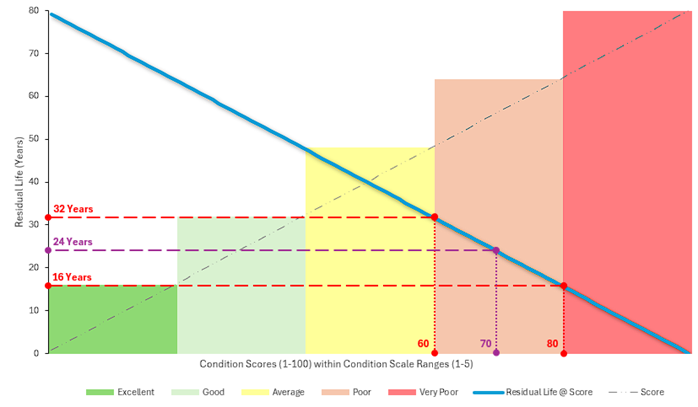
The above image shows the interpolation of calculated Residual Life values from raw Condition Scores and Condition Scales.
Configuration
The Residual Life Report has support for the following configuration options:
Effective Date for Residual Life Calculations
The date to use for calculating the residual life values, relative to each component’s useful life.
When “Use Condition Record Date per Component” is selected, the effective date will be determined by each component’s latest condition record date within the specified condition date limits.
Data filter
The predefined filter to use in restricting the data returned by the report.
Condition Selection Criteria
There are several Condition Selection Criteria that can be used to ‘refine’ the type and scope of Condition Assessments you wish to require to satisfy this report. It is important to note that (unless explicitly requested) the Condition Selection Criteria will NOT limit the Components that are exported by the report. Rather, it limits what Condition records are considered valid for the report. The criteria include:
Condition Date Range Upper Limit
The latest condition record date to consider when selecting condition records for residual life calculations. Condition records captured after this date will be excluded. Please note that this does not exclude components from the export, rather, it simply limits what condition records are considered relevant when calculating residual life. Clearing this value will default it to today.
Condition Date Range Lower Limit
The earliest condition record date to consider when selecting condition records for residual life calculations. If left blank, all condition records prior to the upper limit will be considered. Please note that this does not exclude components from the export, rather, it simply limits what condition records are considered relevant when calculating residual life.
Condition Function Limitations
Select the condition function(s) as a filter for condition records to use for residual life calculations. Only condition records captured against the selected function(s) will be considered. Please note that this does not exclude components from the export, rather, it simply limits what condition records are considered relevant when calculating residual life. No Exclusions when Blank.
Exclude Components without Condition Records
Components with no condition records matching the specified criteria will NOT be exported. Enabling this will exclude any components that do not have condition records matching the specified criteria. It should be noted that, even with default criteria, some components will not have a valid condition record and will be excluded by this option.
Output
Depending on the report configuration options above, the Residual Life Report will generate the following fields. Fields marked with an asterisk are compliant with reimportation for Component Updates.
Component Record ID *
The unique identifier for the Component record. This field is also vital for importing the dataset as a Component Update.
Intervention Residual Life *
This is the calculated Residual Life of the Component, based on the most relevant Condition record, as per any Condition Selection Criteria. The field name is consistent with the Component Update Import template for modifying a Components Residual Life value.
Lower Range Residual Life
This is the calculated lower range Residual Life of the Component. This value is predicated on the ‘worst-case’ scenario of the relevant Condition Scale.
Upper Range Residual Life
This is the calculated upper range Residual Life of the Component. This value is predicated on the ‘best-case’ scenario of the relevant Condition Scale.
Intervention Useful Life *
This is the Component’s useful life value. It is included in the report to provide users with context for the Residual Life calculations.
Effective Date *
This is the date in which the calculated Residual Life is ‘effective’ from. Report configuration options can alter this value. When performing an update on Residual Life values, the effective date gives the context of ‘when’ the change applies from; this is vital because Residual Life changes over time.
Effective Date Basis
This is an informational field detailing the way the effective date was set in the report’s initial configuration options. It will be either ‘Condition’ or ‘Custom’. If ‘Condition’, it indicates that the date of the Condition Assessment is being used (per-component) as the effective date of Residual Life calculations. A ‘Custom’ basis indicates that the user supplied a fixed date for calculating Residual Life values.
Residual Life as at Effective Date
This value is included to provide the user with context around what the Component’s Residual Life value would be at the supplied/derived effective date (above) without any data alterations.
Residual Life Range Differential as at Effective Date
This value is included to provide the user with context around what the difference between ‘current’ values and calculated values are. It is important to note that comparisons are always made to the upper/lower bound estimates, rather than the calculated Residual Life. The graph below highlights the measurements that this figure indicates.

In the above graph, the following is occurring:
- Point ‘A’ falls below the lower estimate, therefore its differential is calculated from the lower estimate.
- Point ‘B’ falls above the upper estimate, therefore its differential is calculated from the upper estimate.
- Point ‘C’ falls within the lower/upper estimates, therefore there is zero differential.
Residual Life as at Now
This value is included to provide the user with context around what the Component’s Residual Life value is as at the date of generating the report. This does not reflect the the supplied/derived effective date (above).
Selected Condition Record Function
This value indicates the underlying Condition Function used for the Component’s relevant Condition Assessment. Essentially, it indicates the method of Condition Assessment per-row.
Selected Condition Record Date
This value indicates ‘when’ the relevant Condition Assessment was conducted. Note; if the ‘Effective Date Basis’ is set to ‘Condition’, this value will also be the ‘Effective Date’.
Selected Condition Raw Value
This is the underlying raw score for the relevant Condition Assessment. This is used to derive the Useful Life multiplier for Residual Life calculations.
Selected Condition Value
This is the ‘scaled’ Condition value of the relevant Condition Assessment. Until the report supports custom ‘Condition Scale’ inputs (coming soon), it will always be a value between 1-5.
Condition Curve
This field is a placeholder for an upcoming feature that will permit users to define a custom relationship between raw Condition scores and Life Multiplier values. Until the report supports such custom ‘curves’ (coming soon), it will always be ‘Straight Line’.
Condition Curve Life Multiplier
This field is a placeholder for the abovementioned ‘Condition Curve’ feature that will permit users to define a custom relationship between raw Condition scores and Life Multiplier values. Until the report supports such custom ‘curves’ (coming soon), this value will always reflect the ‘Straight Line’ calculation metric described in the ‘Core Functionality’ section of this guide.
Selected Condition Functions
This is an informational field that reflects the reports underlying Configuration options. If the user selects one or more ‘Condition Functions’ in as ‘Condition Function Limitations’, they will be listed here. Otherwise, this field will state, ‘No Restrictions’.
Condition Scale Used
This is an informational field that reflects any constraints placed on the ‘Condition Scale’ used in calculating the lower/upper estimates. This is a placeholder field and will always state, ‘System Default’ until custom Condition Scale selections are supported by the report (coming soon).
Warnings
This field may contain one or more messages per-row. These predefined messages are aimed at picking up known scenarios that may be pertinent to the Component’s current state. The following are considered:
- Missing construction/intervention date.
- Construction/Intervention date greater than effective date.
- Could not calculate residual life value as intervention useful life is missing.
- Could not calculate residual life value as condition value is missing or no condition matches criteria’.
- Residual life as at effective date is outside condition range residual life bounds.
Coming Soon
Due to the beta status of this report, there are a couple of features that have yet to be fully rounded out, and as such, are flagged as ‘Coming Soon’. The following gives a brief overview of these features.
Condition Curves (Ageing Profiles)
Condition curves will allow sites to define custom relationships between condition raw values (1-100) and the corresponding life multiplier values. As detailed throughout this guide, the current methodology for ageing profiles is ‘Straight Line’ where each increment in raw condition score, reflects a like decrement in the life multiplier.
Condition Scales (Bounds for Estimations)
Custom condition scales, aside from enabling sites to define condition ranges such as 1-10 (or similar), will also enable sites to have some control over the scale of upper/lower bounds for life estimates. That is, if you control the range of raw condition scores covered by a condition’s corresponding scale, then you also control the upper/lower estimates for residual life.