Merging Assets
From time to time, your network of assets may become too bifurcated. For these scenarios, the Metrix Asset Management system has support for users merging assets.
Merge Assets
To merge two or more asset records:
-
Navigate to the main ‘Assets’ page and make a collection from the map screen. This will represent the assets you wish to merge together as one.
-
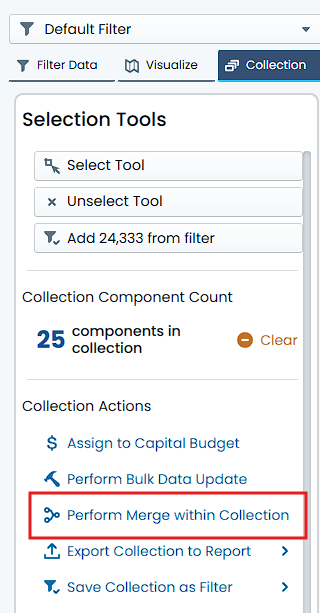
From the Collections side-bar options, choose ‘Perform Merge within Collection’.
-
Confirm the Asset Classification of the Assets that you wish to merge. This step is provided to prevent accidental merge of adjacent assets/components.
-
Confirm the selected records (within the Assset Classification) that will be merged. This is essentially a preview of what you have selected, once again to prevent accidental merge of adjacent assets/components. Click ‘Continue’.
-
Supply a Posting Date, if required. If the underlying Asset(s) have any capital value, you will be prompted for a Posting Date value. Enter a Posting Date if required. Then click ‘Generate Merge Preview’.
-
The system will analyse the request and return a preview of the merge operation, along with any merge conflicts discovered.
-
Navigate through the tabs of ‘Asset Data’, and ‘Component Group Data’. At the top of each tabbed section, a highlight will detail any merge conflicts within the tab that MUST be resolved. Review the data in each tab, resolve any merge conflicts, and generally review the data that will be created on the new merged record(s).
-
Once on the ‘Finalise and Review’ tab, you can click ‘Complete Merge’. This will commit the merge operation.